Hedge Procreate Brush: Elevate Your Digital Foliage
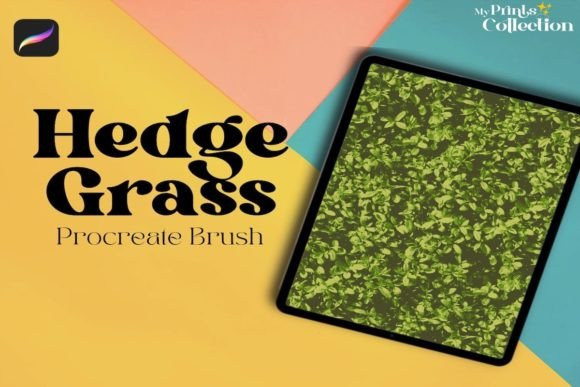
Digital illustration often hits a plateau when artists attempt to render organic textures. While geometric shapes and clean lines are manageable with standard tools, nature is chaotic, layered, and unpredictable. This is where specialized tools become essential rather than optional. The Hedge Procreate Brush addresses this specific challenge by providing a streamlined solution for adding realistic foliage and leaves to digital art and nature landscapes. It is not merely a stamp; it is a designed instrument that understands the way light hits leaves and how branches intertwine.
For creators working within the iPad ecosystem, integrating this tool can significantly reduce the time spent on tedious detailing. Instead of painting every individual leaf from scratch, you gain the ability to build complex greenery with intention and speed. This shift allows you to focus more on composition and lighting, two elements that truly bring a landscape to life.
Why Specialized Foliage Tools Matter
Many digital artists start with basic round brushes or textured markers when attempting to draw trees and bushes. The result is often flat or overly uniform. Nature does not repeat itself perfectly, yet standard brushes tend to create patterns that the human eye immediately recognizes as artificial. The Hedge Procreate Brush breaks this cycle by offering varied edge dynamics and opacity controls that mimic the irregularity of real plant life.
When you use a tool designed specifically for hedges and foliage, you are leveraging pre-tested algorithms that handle density and overlap. This means your foreground bushes look dense and inviting, while your background trees maintain atmospheric perspective without becoming muddy. The brush interacts with the canvas in a way that respects the underlying layers, allowing for natural blending that feels grounded in reality.
Creative Applications Across Genres
The versatility of this brush extends beyond simple landscape painting. Different creative professionals can adapt its features to suit their unique project requirements.
Concept Art and Environment Design
For concept artists working in gaming or film, speed is critical. You need to iterate quickly on environment ideas to communicate mood and scale. Using the Hedge brush, you can block out entire forest scenes in minutes. This rapid prototyping allows directors and art leads to visualize the density of a jungle or the overgrowth of an abandoned city without getting bogged down in micro-details too early in the process.
Children’s Book Illustration
Illustrators often need to create whimsical, soft-edged environments that frame characters without distracting from them. The brush can be adjusted to produce softer, more stylized foliage that complements hand-drawn characters. By lowering the opacity and using pastel color palettes, you can create dreamy backdrops that feel cohesive and gentle, perfect for bedtime stories or educational materials.
Architectural Visualization
Even in technical fields like architecture, digital sketches benefit from organic elements. A building rarely stands in isolation. Adding realistic hedges and tree lines around a structure helps clients understand the scale and integration of the design into its environment. The precision of the Hedge brush ensures that the foliage looks intentional and well-maintained, reflecting the professional quality of the architectural proposal.
Mastering the Technique
To get the most out of the Hedge Procreate Brush, it is important to understand how to layer and vary your approach. Simply stamping the brush repeatedly will still look repetitive. Here are practical steps to ensure your results remain original and effective:
- Vary Your Pressure: Use Apple Pencil pressure sensitivity to control the density of the foliage. Light touches create sparse, airy leaves, while heavier pressure builds thick, dark clusters.
- Rotate the Canvas: Do not paint all foliage in one direction. Rotate your canvas frequently to ensure leaves grow naturally from different angles, mimicking how plants reach for light.
- Layer Colors: Start with a dark base layer for shadows, then add mid-tones, and finish with highlights. This three-step process adds depth and prevents the "flat" look common in digital painting.
- Use Clipping Masks: Paint your general hedge shape on one layer, then use a clipping mask above it to add detailed leaves. This keeps your workflow non-destructive and organized.
Consistency is key when working on larger pieces. Establish a limited color palette for your vegetation before you begin. This ensures that even if you use the brush extensively, the overall image remains harmonious. Avoid using pure green; instead, mix in blues, yellows, and browns to reflect environmental lighting and soil tones.
Technical Requirements and Compatibility
Before purchasing or downloading, it is crucial to verify that your setup supports the tool. The Hedge Procreate Brush is designed exclusively for the Procreate app on iPad. It requires Procreate App version 5 or higher to function correctly, as it utilizes specific engine features introduced in that update for better texture rendering and pressure response.
It is important to note what this tool is not. It is not compatible with Photoshop, Illustrator, or other desktop-based software. If your workflow relies heavily on Adobe Creative Cloud, this brush will not integrate into your pipeline. However, for those fully invested in the mobile digital art ecosystem, it offers a level of optimization that desktop plugins often struggle to match due to touch interface differences.
Enhancing Workflow Efficiency
For freelancers and small business owners, time is a direct factor in profitability. Reducing the hours spent on rendering leaves means more time for client communication, marketing, or taking on additional projects. The Hedge brush acts as a force multiplier for your productivity. It allows you to deliver high-quality, detailed illustrations faster than traditional manual methods.
Moreover, the consistency provided by a specialized brush helps in building a recognizable style. When your foliage has a distinct, high-quality look across all your works, it contributes to your brand identity. Clients begin to associate that lush, natural aesthetic with your name, which can be a significant competitive advantage in crowded marketplaces.
Final Thoughts on Digital Nature
Creating convincing nature scenes is one of the hardest skills to master in digital art. It requires an understanding of biology, light, and composition. Tools like the Hedge Procreate Brush do not replace this knowledge but rather facilitate its expression. They remove the technical friction of drawing every single leaf, allowing your artistic intuition to guide the process.
Whether you are a hobbyist looking to improve your weekend sketches or a professional designer needing reliable assets for a commercial project, integrating specialized foliage tools can elevate your work. Embrace the chaos of nature by controlling it with precision tools. Experiment with different pressures, colors, and layering techniques to discover how this brush can transform your digital landscapes from flat images into immersive environments.
Remember, the goal is not just to fill space with green pixels, but to create atmosphere. Use the brush to tell a story about the environment—is it wild and untamed, or manicured and orderly? Let the tool serve your narrative, and your digital art will resonate more deeply with your audience.