Mastering Texture: A Practical Guide to the Cracked Dirty Ground Procreate Brush
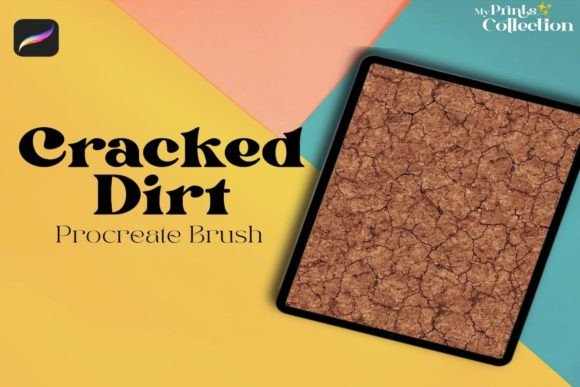
Digital illustration often struggles with one specific hurdle: achieving the organic, unpredictable imperfections of the physical world. While vector tools and standard digital brushes excel at clean lines and smooth gradients, they can sometimes feel sterile when depicting weathered surfaces. This is where specialized texture tools become essential for professional workflows. The Cracked Dirty Ground Procreate Brush addresses this gap by offering a targeted solution for artists who need to integrate realistic earth tones, fissures, and grime into their compositions without spending hours manually painting every detail.
For digital artists working within the iPad ecosystem, understanding the specific utility of this tool requires looking beyond simple aesthetics. It is not merely about adding a filter; it is about incorporating a seamless pattern texture that interacts logically with lighting and perspective. This article explores the functional capabilities of this brush, compares it to broader texturing methods, and helps you determine if it fits your current artistic toolkit.
Understanding the Tool’s Core Functionality
The primary value proposition of the Cracked Dirty Ground Procreate Brush lies in its specificity. Unlike generic noise or grain brushes that apply uniform randomness across a canvas, this tool is designed to mimic the structural breakdown of soil and pavement. When applied, it creates a cohesive visual language of decay and age. The brush engine in Procreate allows for pressure sensitivity and tilt recognition, meaning the intensity of the "crack" and the density of the "dirt" can vary based on how you hold your Apple Pencil.
What makes this distinct from a standard photo overlay is the level of control it retains within the drawing process. You are not pasting a static image; you are painting with a dynamic stamp that adapts to your stroke direction. This is crucial for maintaining the hand-drawn feel of digital art. The included seamless pattern texture ensures that when you tile the brush or use it for large background fills, there are no visible repetition artifacts, a common pitfall in lower-quality digital assets.
It is important to note the technical constraints early in your evaluation. This resource is strictly formatted for the Procreate App version 5 or higher. It is not compatible with Photoshop, Illustrator, or other desktop-based raster or vector software. This limitation is significant for artists who maintain a hybrid workflow between iPad and desktop. If your pipeline relies heavily on Adobe Creative Cloud, this specific brush file will not integrate directly, requiring you to seek alternative formats such as .ABR (Photoshop Brush) or high-resolution PNG patterns.
Comparing Specialized Brushes vs. General Texturing Methods
When deciding whether to invest time in learning a specialized tool like the Cracked Dirty Ground Procreate Brush, it is helpful to compare it against three common alternatives: manual painting, photo bashing, and procedural generators.
- Manual Painting: Creating cracked earth from scratch requires a deep understanding of geology and light physics. You must paint individual fissures, add subsurface scattering for depth, and layer dust particles. While this offers maximum creative control, it is incredibly time-consuming. The specialized brush reduces this workload by providing a pre-calculated base structure that you can then refine.
- Photo Bashing: Many concept artists photograph real ground textures and blend them into their work. This yields high realism but can clash with stylized illustrations. If your art style is semi-realistic or painterly, a photo overlay may look too sharp or photographic. The Cracked Dirty Ground Procreate Brush offers a middle ground, providing realistic detail that still feels like it was painted by hand.
- Procedural Generators: Software like Substance Designer can create infinite variations of cracked ground. However, these tools have a steep learning curve and require powerful hardware. For quick iterations or mobile-first workflows, Procreate offers immediacy. This brush brings a fraction of that procedural complexity into a simple, tap-and-drag interface.
The tradeoff here is flexibility versus speed. A procedural node graph can change the moisture level of the dirt dynamically. This brush provides a fixed aesthetic. If you need wet mud one moment and dry desert sand the next, you may need multiple brushes or additional color adjustment layers. However, for consistent stylistic applications, the single-brush approach is far more efficient.
Ideal Use Cases and Artistic Applications
Identifying where this tool shines helps justify its place in your library. The Cracked Dirty Ground Procreate Brush is particularly effective in genres that rely on environmental storytelling. Consider the following scenarios:
- Fantasy and RPG Concept Art: Designing maps, dungeon floors, or wasteland environments requires repetitive texturing. Using this brush allows for rapid prototyping of terrain types. You can quickly establish the mood of a desolate battlefield or an ancient ruin.
- Horror and Thriller Illustrations: Decay is a central theme in these genres. The "dirty" aspect of the brush adds a layer of unease and neglect that clean digital strokes often lack. It helps ground supernatural elements in a tangible, gritty reality.
- Architectural Visualization: While often associated with pristine renders, architectural sketches benefit from weathering. Adding cracked pavement around a building proposal can help clients visualize how the structure ages and interacts with its environment over time.
In each of these cases, the brush serves as a foundational layer. It is rarely used in isolation. Professional artists typically apply the texture on a separate layer, set to blending modes like Multiply or Overlay, allowing them to adjust opacity and color hue without destroying the underlying sketch. This non-destructive workflow is key to maximizing the utility of the tool.
Limitations and Decision Factors
No tool is universal, and recognizing the limitations of the Cracked Dirty Ground Procreate Brush is vital for informed decision-making. First, because it is a single brush rather than a massive pack, it offers limited variation. If your project requires diverse soil types—clay, silt, sandy loam—you may find the texture repetitive if overused. Mitigating this requires skillful rotation, scaling, and color variation within Procreate.
Second, the resolution dependency matters. While Procreate handles high-resolution canvases well, stretching a small brush stamp over a massive print-sized canvas can reveal pixelation. Always test the brush at your intended output size. If you are creating billboards or large-format prints, ensure the source texture has sufficient density.
Finally, consider your software ecosystem. As noted, the incompatibility with Photoshop and Illustrator is a hard boundary. If you collaborate with teams using Adobe products, you cannot share the native brush file. You would need to export your textured layers as flat images, which reduces editability for your collaborators. For solo creators or those fully invested in the Apple ecosystem, this is irrelevant. For agency-level workflows, it may be a friction point.
Making the Right Choice for Your Workflow
Choosing the right texturing resource depends on your specific needs for speed, style, and compatibility. The Cracked Dirty Ground Procreate Brush is an excellent choice if you prioritize workflow efficiency within Procreate and seek a stylized yet realistic earthy aesthetic. It excels in situations where you need to add immediate character and age to a scene without getting bogged down in manual detailing.
However, if you require cross-platform compatibility, extensive material variation, or photorealistic precision, you might explore broader texture libraries or desktop-based procedural tools. Evaluate your current projects: do you frequently draw environments that require weathering? Do you work exclusively on iPad? If the answer is yes, this specialized brush offers a high return on investment by streamlining a traditionally tedious part of the digital painting process. By integrating such targeted tools, artists can focus more on composition and narrative, letting the brush handle the intricate details of the ground beneath their characters' feet.