Glam: Retro Procreate Lettering Brush
Digital lettering often struggles to capture the tactile warmth of analog tools. We spend hours adjusting opacity and flow, trying to mimic the organic imperfections of ink on paper, yet the result can still feel sterile. This is where Glam - a Retro Procreate Lettering Brush changes the workflow. It is not just another tool in your library; it is a bridge between the precision of the iPad and the soulful aesthetic of vintage print. Designed for creators who value both efficiency and style, this brush set offers a distinct character that elevates hand lettering, bold illustration, and graphic design projects instantly.
The core appeal of Glam lies in its pressure sensitivity and responsive width variation. When you press down with your Apple Pencil, the line thickens with a natural swell; lift slightly, and it tapers into a delicate hairline. This dynamic range allows for expressive calligraphy and robust comic outlining without the need for complex layer adjustments. Whether you are sketching manga characters, designing fashion illustrations, or creating intricate makeup charts, the brush responds intuitively to your hand movements, making the digital canvas feel surprisingly physical.
Two Versions for Distinct Creative Needs
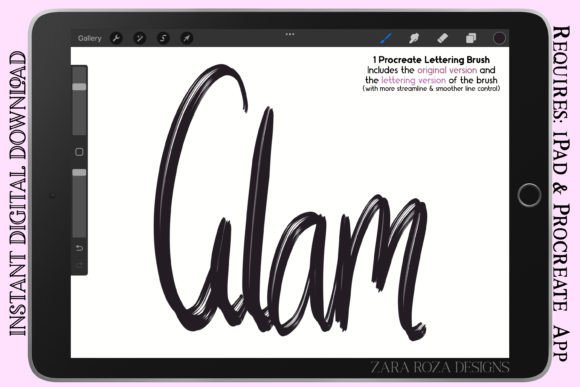
One size rarely fits all in creative work. Recognizing that different projects demand different levels of control, Glam comes with two carefully calibrated versions. Understanding when to use each can significantly streamline your process and improve the final output.
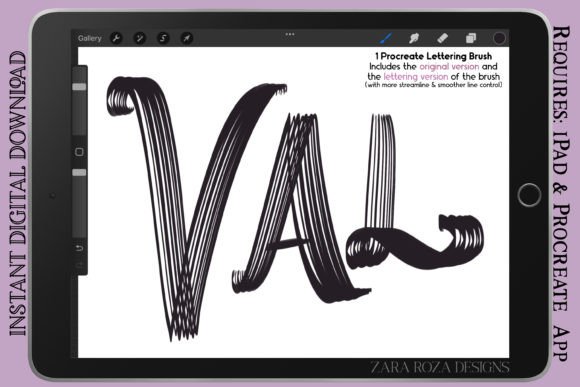
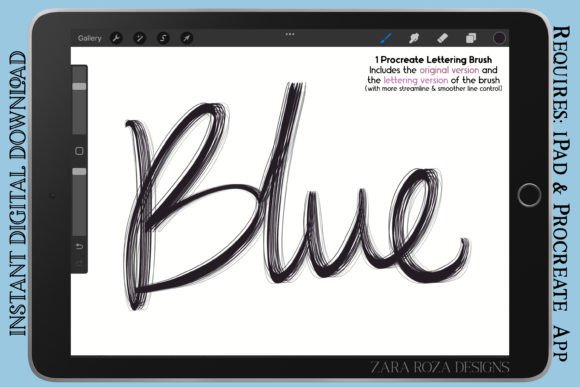
The Original Version offers regular line control. It retains a slight texture and organic variability that suits rough sketching, casual doodles, and lettering styles that benefit from a raw, hand-drawn feel. If you are working on concept art, storyboarding, or illustrative pieces where perfection is not the goal, this version adds a layer of authenticity. It mimics the behavior of a well-used marker or a soft charcoal pencil, providing enough friction to keep your lines grounded.
In contrast, the Lettering Version is engineered for precision. It provides a more streamlined experience with smoother line control, making it ideal for polished hand lettering, logos, and detailed outline work. When you need crisp edges for comic book panels, clean typography for social media graphics, or refined contours for portrait art, this version delivers consistency without sacrificing the retro aesthetic. It reduces jitter and ensures that every curve and serif looks intentional and professional.
Expanding Beyond Lettering
While the name suggests a focus on typography, the versatility of Glam extends far beyond words. Graphic designers and illustrators can leverage its bold stroke capabilities for a variety of applications. For instance, in fashion sketches, the brush can quickly define the drape of fabric or the sharp lines of a garment’s silhouette. The pressure sensitivity allows artists to vary line weight dynamically, adding depth and dimension to flat drawings without switching tools.
Comic artists and manga creators will find the brush particularly useful for inking. The ability to switch between the rougher Original Version for background textures and the smooth Lettering Version for character outlines provides a comprehensive toolkit within a single purchase. You can create dramatic shadows, define chibi character features, or draw intricate anime eyes with a tool that feels responsive and reliable. The retro aesthetic also lends itself well to vintage-style posters, zines, and editorial illustrations where a nostalgic touch is required.
Even beauty professionals and educators can benefit. Imagine drawing makeup charts or educational diagrams with a tool that makes technical drawings look approachable and stylish. The clear, bold lines help emphasize key areas, while the aesthetic quality keeps the content engaging for students or clients.
Practical Tips for Best Results
To get the most out of Glam, consider how you hold your Apple Pencil and the angle at which you work. Since the brush simulates real-world markers and pens, tilting your stylus can affect the stroke width and texture. Experiment with different angles to discover how the brush reacts. For thick-thin variation in calligraphy, maintain a consistent angle relative to your baseline, applying pressure on downstrokes and lifting on upstrokes.
Layer management is also crucial. When using the brush for complex compositions, such as comic pages or detailed portraits, keep your lettering or line art on separate layers from your coloring. This allows you to adjust the color of your lines independently, a common technique in modern digital comics. You might choose a dark brown instead of pure black for a softer, more vintage look, or use a deep navy for a nautical theme. The flexibility of Procreate combined with the specific characteristics of Glam makes these adjustments seamless.
For those interested in aesthetic painting or stylized illustration, try using the brush at lower opacity settings. This can create a layered, build-up effect similar to watercolor or ink washes. It is an excellent technique for adding shading to doodles or creating atmospheric backgrounds that complement your main subject.
Who Is This Tool For?
Glam is designed for a wide spectrum of creators. Freelancers and small business owners can use it to create unique branding elements, from logo drafts to social media quotes that stand out in a crowded feed. The retro vibe appeals to audiences looking for authenticity and craftsmanship, helping brands connect on a more personal level.
Educators and bloggers can use the brush to create engaging headers, diagrams, and visual aids that break up text-heavy content. The clarity of the Lettering Version ensures readability, while the stylistic flair keeps readers interested. For hobbyists and digital journalers, the brush offers a satisfying drawing experience that encourages daily practice and creativity. It transforms the act of writing into an artistic endeavor, making bullet journals and planners visually appealing.
Professional graphic designers will appreciate the time saved by having a go-to brush that handles both rough concepts and final polish. Instead of toggling between multiple tools, you have two optimized versions ready for immediate use. This efficiency allows you to focus more on composition and message rather than technical setup.
Integrating Glam into Your Workflow
Start by importing the brush set into Procreate and organizing your workspace. Create a template file with pre-set layers for sketching, inking, and coloring. Test both versions of Glam on a blank canvas to feel the difference in resistance and flow. Keep a reference sheet of alphabets and basic shapes drawn with each version to remind yourself of their specific strengths.
When starting a new project, ask yourself what tone you want to convey. If it is playful and informal, the Original Version might be your best bet. If it is corporate, elegant, or needs high legibility, switch to the Lettering Version. Do not be afraid to mix them within the same piece. Use the rougher texture for background elements and the smooth lines for foreground subjects to create visual hierarchy.
Remember, tools are only as good as the intent behind them. Glam provides the aesthetic foundation, but your creativity drives the result. Use it to experiment with new styles, challenge your usual techniques, and bring a touch of retro charm to your digital art. Whether you are drafting a quick cartoon or refining a detailed portrait, this brush set offers the reliability and style needed to make your work stand out.
By understanding the nuances of pressure sensitivity, line control, and version selection, you can unlock the full potential of Glam - a Retro Procreate Lettering Brush. It is a practical, versatile addition to any digital artist’s toolkit, offering endless possibilities for expression across various mediums and styles.