Panda Face Graphics Set: A Versatile Resource for Digital Creators
In the rapidly evolving landscape of digital design, the demand for high-quality, adaptable assets is higher than ever. Whether you are a seasoned graphic designer, a small business owner managing your own branding, or a hobbyist creating custom invitations, finding the right visual elements can make or break a project. Enter the Panda Face Graphics Set, a curated collection designed to bridge the gap between professional-grade utility and user-friendly accessibility. This article explores the intricacies of this asset pack, examining its technical specifications, practical applications, and the unique value it offers to a diverse range of creators.
Understanding the Core Components
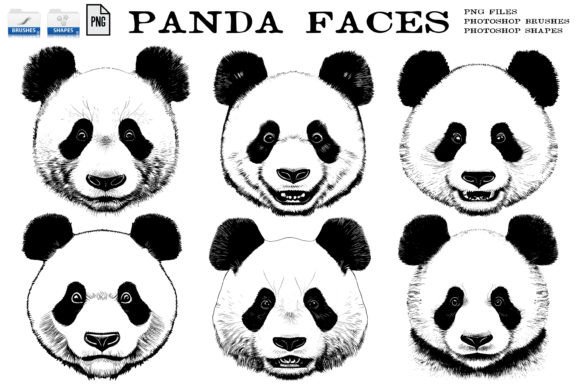
At first glance, the Panda Face Graphics Set might appear to be a simple collection of illustrations. However, a deeper look reveals a thoughtfully structured package aimed at maximizing workflow efficiency. The set comprises six distinct panda bear faces, each capturing a different expression or angle. While the subject matter is charming and universally appealing, the true value lies in how these graphics are delivered.
Each graphic is provided in PNG format at 300dpi on a transparent background. For those unfamiliar with technical terms, DPI (dots per inch) refers to the resolution of the image. A 300dpi resolution is the industry standard for high-quality printing, ensuring that your designs remain crisp and clear whether they are displayed on a screen or printed on physical merchandise. The transparent background is equally crucial; it allows you to place the panda faces onto any color, pattern, or photograph without unsightly white boxes surrounding the image.
Beyond Standard Images: Brushes and Shapes
What truly sets this package apart from generic clipart libraries is the inclusion of specialized file formats for Adobe Photoshop users. Each of the six graphics is also included in a Photoshop Brush file (.abr) and a Photoshop Custom Shape file (.csh).
- .abr Files (Brushes): These allow you to "paint" with the panda faces. Instead of importing an image, resizing it, and positioning it manually every time, you can simply select the brush and click to stamp the graphic. This is invaluable for creating repetitive patterns, borders, or playful backgrounds quickly.
- .csh Files (Custom Shapes): These convert the panda faces into vector-like paths within Photoshop. This means you can scale the shapes to any size without losing quality, change their fill colors instantly, and manipulate them using Photoshop’s powerful path tools. It offers a level of flexibility that static PNGs cannot match.
Additionally, the set includes one bonus JPG seamless tiling pattern. This feature allows designers to create endless backgrounds by repeating the pattern horizontally and vertically without visible seams. It is an excellent tool for website backgrounds, packaging paper, or textile designs.
Who Benefits from This Graphics Set?
The versatility of the Panda Face Graphics Set means it serves a wide audience. Understanding who can benefit most helps in evaluating whether this tool fits your specific needs.
- Small Business Owners: If you run a boutique selling children’s clothing, stationery, or eco-friendly products, these graphics can serve as immediate branding elements. The high resolution ensures they look professional on product tags and packaging.
- Educators and Parents: Teachers creating classroom materials or parents designing homemade learning aids can use these friendly faces to engage children. The transparent backgrounds make it easy to overlay text or integrate them into worksheets.
- Digital Marketers: Social media managers often need quick, eye-catching visuals. Using the .abr brush files, they can rapidly generate consistent decorative elements for Instagram stories or Facebook posts, maintaining brand consistency with minimal effort.
- Print-on-Demand Sellers: Artists selling designs on platforms like Redbubble or Etsy can use the .csh files to create scalable designs for t-shirts, mugs, and phone cases, ensuring the final print quality is sharp regardless of the product size.
Practical Applications and Real-World Scenarios
To fully appreciate the utility of the Panda Face Graphics Set, let us consider a few concrete scenarios where these assets shine.
Scenario 1: The Birthday Invitation
Imagine you are designing a digital invitation for a child’s zoo-themed birthday party. Using the PNG files, you can drag and drop a smiling panda face onto a colorful background. Because the background is transparent, it blends seamlessly. You can then add text over the image without worrying about clipping masks or complex layering techniques.
Scenario 2: The Website Header
A blogger focusing on conservation or wildlife might want a subtle, recurring motif in their site header. By utilizing the bonus seamless tiling pattern, they can create a lightweight, visually interesting background that does not distract from the main content but adds thematic depth.
Scenario 3: The Custom Sticker Sheet
A designer creating a sheet of printable stickers for planners can use the .abr brush file. By adjusting the spacing and size variation in the brush settings, they can quickly scatter multiple panda faces across a canvas, creating a dynamic and organic layout that would take much longer to achieve by placing each image individually.
Evaluating Suitability: Strengths and Considerations
While the Panda Face Graphics Set offers significant advantages, it is important to approach it with realistic expectations. No single asset pack is a one-size-fits-all solution.
Strengths
The primary strength is efficiency. The inclusion of brushes and shapes transforms static images into dynamic tools. This reduces the time spent on repetitive tasks, allowing creators to focus on the broader composition of their projects. Furthermore, the 300dpi resolution ensures that the assets are future-proof, suitable for both web and print media.
Limitations and Considerations
It is essential to note that this set is specific to Adobe Photoshop for the advanced features. Users of other software, such as GIMP, Affinity Photo, or Canva, will still find value in the PNG files and the JPG pattern, but they will not be able to utilize the .abr and .csh files directly. Additionally, while six variations provide a good range of expressions, projects requiring a vast array of different animals or highly complex poses may need to supplement this set with other resources.
Another consideration is style consistency. The panda faces have a specific artistic style. If your project requires a photorealistic look or a vastly different illustration style, these graphics may clash. Always evaluate the aesthetic fit before integrating new assets into an established brand identity.
Maximizing Value: Tips for Integration
To get the most out of your purchase, consider these best practices:
- Experiment with Blending Modes: When using the PNGs in Photoshop, try changing the layer blending modes (such as Multiply or Overlay) to integrate the pandas more naturally into textured backgrounds.
- Combine with Typography: Panda faces are expressive. Pair them with bold, playful fonts for children’s projects, or clean, minimalist sans-serifs for a modern, chic look.
- Layering: Do not be afraid to layer multiple instances of the graphics. Use the transparent nature of the PNGs to create depth by overlapping faces at different opacities.
Conclusion
The Panda Face Graphics Set represents more than just a collection of cute images; it is a functional toolkit designed to streamline the creative process. By offering multiple file formats—including high-resolution PNGs, versatile Photoshop brushes, and scalable custom shapes—it caters to both novice users and experienced professionals. The added bonus of a seamless tiling pattern further extends its utility for background design and textile applications.
For anyone looking to add a touch of whimsy and professionalism to their digital or print projects, this set provides a solid foundation. While it is specifically optimized for the Adobe ecosystem, the core assets remain valuable across various platforms. By understanding its features and limitations, creators can effectively leverage this resource to enhance their visual storytelling, save time, and produce high-quality results. As with any design tool, the key lies in experimentation and integration, allowing the Panda Face Graphics Set to become a seamless part of your creative workflow.