Safety Rescue Procreate Brush Stamps: Essential Tools for Digital Illustrators
In the rapidly evolving world of digital art, efficiency and versatility are paramount. For artists using the iPad, Safety Rescue Procreate Brush Stamps offer a unique solution to common illustration challenges. These specialized tools allow creators to integrate detailed, hand-drawn elements into their work seamlessly. Whether you are designing emergency response infographics, creating comic book scenes, or developing educational materials, having access to high-quality, pre-drawn assets can significantly streamline your workflow.
This article explores the utility, features, and practical applications of these brush stamps. We will examine how they function within the Procreate ecosystem, who benefits most from using them, and how to maximize their potential in your creative projects.
Understanding the Utility of Digital Brush Stamps
Digital brush stamps differ from standard brushes in that they place a complete image or shape with a single tap, rather than drawing a continuous line. The Safety Rescue Procreate Brush Stamps collection is designed specifically for scenarios requiring safety and rescue imagery. Instead of spending hours sketching complex objects like life jackets or fire extinguishers from scratch, artists can insert these elements instantly.
The primary value lies in consistency and speed. When working on a series of illustrations or a large-scale project, maintaining a uniform style is crucial. Hand-drawn stamps ensure that every instance of a specific object looks cohesive. Furthermore, because these are vector-like raster images optimized for Procreate, they retain clarity at various sizes, allowing for flexible use in both small icons and larger scene compositions.
Key Features of the Collection
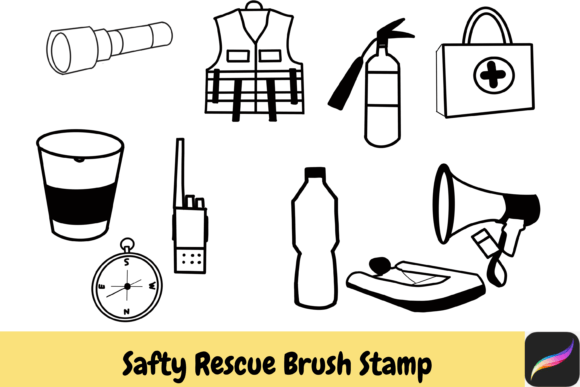
The collection includes ten distinct, hand-drawn items that cover a broad spectrum of safety and rescue themes. Each item is crafted with attention to detail, ensuring they look professional yet approachable. The included items are:
- Water: Essential for depicting floods, swimming scenarios, or hydration contexts.
- Megaphone: Ideal for illustrating communication, warnings, or crowd control situations.
- Compass: Useful for navigation themes, outdoor adventures, or search and rescue operations.
- Instant Noodle: A unique addition that can represent comfort, breaks during long shifts, or survival rations.
- Fire Extinguisher: A critical symbol for fire safety protocols and emergency equipment guides.
- Life Jacket: Vital for water safety illustrations, boating guides, or swim lesson materials.
- Light: Represents visibility, hope, or nighttime rescue operations.
- First Aid Kit: The universal symbol for medical assistance and emergency preparedness.
- Floating Boat: Perfect for maritime rescue scenes or evacuation planning visuals.
- Walkie Talky: Symbolizes coordination, team communication, and operational logistics.
These items are not just static images; they are designed to be interactive elements within your digital canvas. You can rotate, resize, and recolor them to fit the specific aesthetic of your project.
Who Benefits from Safety Rescue Brush Stamps?
The audience for Safety Rescue Procreate Brush Stamps is diverse, ranging from hobbyists to professional designers. Understanding who can benefit helps in evaluating whether this tool fits your needs.
Educational Content Creators
Teachers and instructional designers often need to create engaging visual aids. Safety drills, first aid tutorials, and outdoor education manuals require clear, recognizable icons. Using these stamps allows educators to produce high-quality materials quickly without needing advanced illustration skills. The ability to change colors via the Procreate color palette means these icons can match school branding or specific thematic requirements.
Graphic Designers and Illustrators
For professionals, time is money. Clients often request rapid turnarounds for campaigns related to public safety, insurance, or outdoor gear. Having a library of reliable, hand-drawn assets reduces the time spent on repetitive tasks. Designers can focus on composition and storytelling while using these stamps for detailed elements. The commercial use license included with the download makes them suitable for client work, provided the terms are followed.
Comic Artists and Storytellers
Narrative artists frequently depict action sequences involving rescue or survival. Drawing a realistic fire extinguisher or a detailed life jacket in every panel can be tedious. These stamps provide a consistent base that can be modified to fit the artistic style of the comic. They serve as excellent underlays or final details, depending on the desired level of refinement.
Practical Applications and Real-World Scenarios
To truly appreciate the value of these tools, consider how they might be applied in real-world projects. Here are a few scenarios where Safety Rescue Procreate Brush Stamps shine:
- Emergency Preparedness Brochures: A local community center wants to distribute flyers on flood safety. You can use the Water, Life Jacket, and Floating Boat stamps to create clear, visually appealing instructions. The Megaphone can highlight important announcements.
- Outdoor Adventure Apps: An app developer needs icons for a hiking guide. The Compass, Light, and First Aid stamps can be resized and recolored to match the app’s user interface, providing intuitive navigation cues for users.
- Corporate Safety Training Modules: A construction company requires internal training materials. The Fire Extinguisher and Walkie Talky stamps can illustrate proper equipment usage and communication protocols. The Instant Noodle might even add a touch of humor to break up dense informational content.
In each case, the ability to customize the color ensures that the illustrations blend seamlessly with the overall design language. This flexibility is a key advantage over static clipart, which often comes in fixed colors and styles.
Technical Considerations and Usage Tips
While these brush stamps are designed for ease of use, there are technical aspects to consider to ensure optimal performance.
Installation and Setup
The product is available as an instant download, which typically comes in a compressed file format. You will need to unzip the file before importing it into Procreate. This process is straightforward on most devices but may require a file management app on iOS. Once unzipped, the brush set can be imported directly into Procreate via the "Import" function in the brush library.
Color Customization
One of the standout features is the ability to change colors using your Procreate color palette. However, it is important to note that the underlying structure of the stamp may affect how colors apply. For best results, experiment with different blending modes and opacity settings. This allows you to integrate the stamps more naturally into your artwork, making them look like they were drawn as part of the original piece rather than pasted on top.
Device Compatibility
It is crucial to remember that these brushes are designed for Procreate on iPad only. They are not compatible with other drawing software or operating systems. Ensure that your iPad meets the system requirements for the version of Procreate you are using. Additionally, while the stamps are high-resolution, extremely large enlargements may result in pixelation, so it is advisable to use them at appropriate scales.
Evaluating Suitability for Your Projects
Before purchasing or downloading any digital asset, it is wise to evaluate its suitability for your specific needs. Ask yourself the following questions:
- Do I frequently illustrate safety or rescue themes? If yes, this collection will likely save you significant time.
- Am I comfortable with basic file management? Since you need to unzip files, basic tech literacy is required.
- Do I need commercial rights? The small commercial use license is a valuable feature for freelancers, but always review the specific terms to ensure compliance with your client contracts.
- Is my workflow centered around Procreate? If you use multiple platforms, verify if you can export the stamps as PNGs for use elsewhere, though their primary optimization is for Procreate.
Conclusion
The Safety Rescue Procreate Brush Stamps represent a practical and efficient tool for digital artists. By providing ten carefully hand-drawn elements such as the Water, Megaphone, and First Aid kit, this collection addresses a niche but important need in illustration. Whether you are an educator, designer, or storyteller, these stamps can enhance your workflow, ensure visual consistency, and allow you to focus on the creative aspects of your projects.
Remember, the true power of these tools lies in your imagination. Use them as starting points, modify them to suit your style, and integrate them into your unique artistic vision. With the right approach, these simple stamps can become indispensable components of your digital art toolkit.